Saturday, October 1, 2011

R.I.P. Reputation Management ? New Huge Google Sitelinks Kills Online Reputation Management Industry?

Quick! Google the name of your company. See anything you don't like? A Reputation Management service firm can make it disappear or so that was their sales pitch, that is, until now.

Yesterday we reported on Google’s roll-out of new, huge site-links that appear on branded searches, which pretty much crowds out the entire browser screen contents. Organic search listings not affiliated with the company (such as any damaging reviews) are pushed “below the fold” or to page 2 and beyond, where fewer and fewer eyeballs venture out to.

And of course, buying a paid advertisement on AdWords for your company’s name can now even further push stuff below the fold since ads are now also huge.

The Reputation Management industry has sprouted up in recent years to defend clients against potentially damaging information on the Web. With potential customers doing online product research, bad reviews or complaints that turn up in a search for a company’s name can turn into lost deals or negative publicity. Reputation management services promise to highlight positive pages and bury negative reviews deep in search results. For example, most reputation services do search engine optimization to promote positive pages (such as a company’s Twitter, Facebook or Linked-In Page, or positive reviews), thereby pushing off negative references off the first page of search results. Reputation Management services are typically pitched as another tool companies can use in their marketing and PR efforts.

It's still hard to say how companies who are using reputation management services will respond. While there’s more to Reputation Management than just monitoring the first page of branded search results for your company, for example, there's other stuff like social media reputation management – but social media chatter is pretty transient and quickly disappears over time. But now that Google seems to automatically heavily favor a company’s own webpage automatically via huge sitelinks, what becomes of Reputation Management? Are reputation management issues a thing of the past? Let me know what you think in the comments below.

This post originated on the WordStream Blog. WordStream provides keyword tools for pay-per click (PPC) and search engine optimization (SEO) aiding in everything from keyword discovery to keyword grouping and organization.

Source: http://www.wordstream.com/blog/ws/2011/08/17/rip-reputation-management

article marketing affiliate marketing clickbank experts copywriting experts internet business

Non Profit Web Design Case Summary

 Deep Ripples had the opportunity to assist an international non-profit web design company.


Discovery
Deep Ripples discovered the client had no organic listings for its relevant terms, but had a powerful platform with strong age and pagerank.

Goals
The goal for this client was to optimize the existing site to see if its authority could buoy its position for any valuable search terms, particularly "non profit web design".

Solution
Deep Ripples recommended optimization of existing resources, including reorganizing navigation and optimizing on-page factors and link architecture of their website. An audit of link popularity showed "juicy" links with poorly optimized anchor text that the client could have altered in their favor.

Results:
  • Within 30 days the client achieved top 5 placement in google for the term "non profit web design" (previous rank was somewhere beyond 1000).
  • "non profit web design" is the top source of search traffic to client's site.


Source: http://www.deepripples.com/results/non-profit-web-design

clickbank experts copywriting experts internet business link popularity link exchange

The Ultimate Guide to Using Bing's Webmaster Tools

Bing's Webmaster Tools recently got a nice refresh and update. There is a lot you can do inside of the tools so we figured you'd want to know all about it :)

Also, we've included some free advertising coupons at the end of this guide to help get you started.

Account Dashboard

Bing's webmaster tools are fairly easy to use and the interface is quite clean. On the main account dashboard page you can select whatever site you want, in your account, and see quick stats on:

  • Clicks
  • Impressions
  • Pages Indexed
  • Pages Crawled

The percentages account for the net gain or loss from the week. For more specific site data, and more historical numbers, you would want to get into the site's dashboard which we will cover in the next section.

This initial account dashboard shows all the sites you have in your account and the associated metrics. The data is from a test site I created awhile back and kind of forgot about until they updated the tools over at Bing.
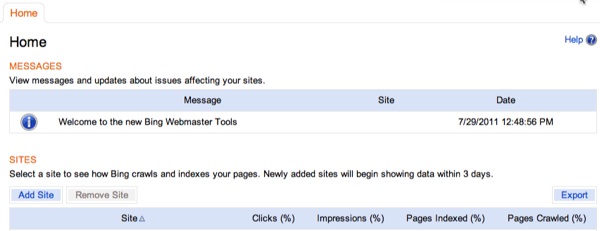
From this page you can:

  • Add sites
  • Remove Sites
  • Export data
  • Click on a site to get to its dashboard
  • See any account specific messages from Bing

A snapshot of all your sites in one place is a good way to immediately spot any recent issues with ranking, indexing, or crawling on your sites.

Once you are ready to move on into a specific site, just click on the site name under the heading "Site". When you click the site's name, you'll be brought to the site's dashboard.

Site Dashboard

Each site you have in Bing's webmaster tools has its own dashboard (not to be confused with the account dashboard). Once you get into a site's dashboard you see the data we talked about above at the top of the dashboard and then a 30 glimpse of the following metrics for the selected site:

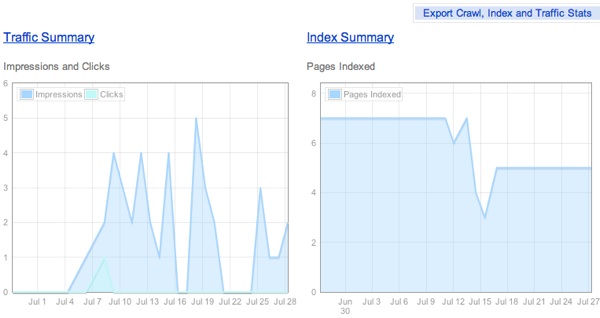
  • Traffic summary
  • Index summary
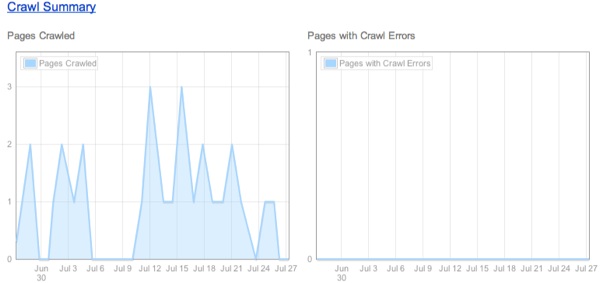
  • Crawl summary (and a separate chart for crawl errors)

Here is what my test site's dashboard looks like:
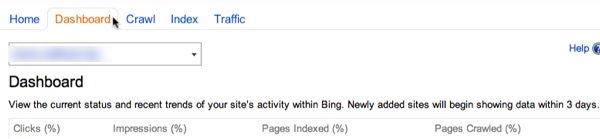


For established sites with steady traffic (if for tracking ongoing campaigns) these 30 day snapshots are good ways for you to get a read on recent site activity and/or issues with traffic, crawling, indexing.

These types of reports can also be very helpful to watch when you are doing site re-structuring or complete site overhauls (changing CMS, url structure, and so on).

Each section has its own place within your site's webmaster tool profile. You can get more information on traffic, indexing, and crawling just by clicking the approriate link and we'll discuss each of these sections below.

Traffic Summary

Inside the Traffic Summary tab you have 2 options:

  • Traffic Summary - 6 month history of traffic and search query performance
  • Page Summary - Same as Traffic Summary except the data is broken out by page with the option to click through to the page's search query report

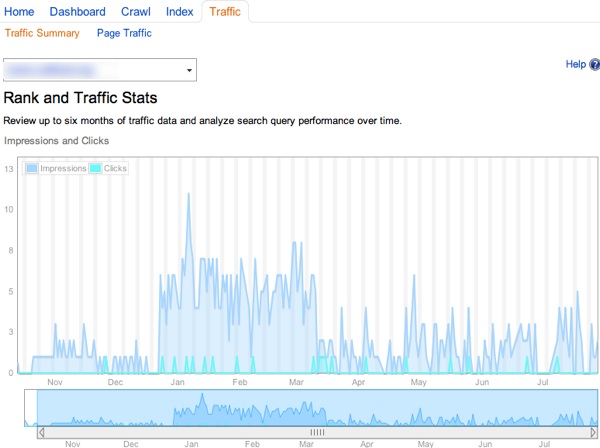
On this page the second chart listed is one that you can slide back and forth to shorten or lengthen the history of the data you are looking at.

The lines are color coded to show overall impressions versus clicks. Bing does present the data in a clean and easy to understand way inside of their webmaster tool reports.
The second chart on the traffic summary page shows search query performance. You'll see keywords you received traffic for as well as ones that you gained impressions (but no clicks) for:
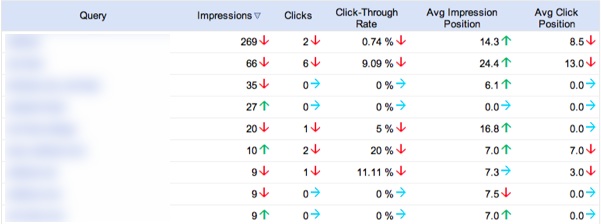
This report is in conjunction with the first report of overall traffic/impressions from a time view. If you shorten the report this report will adjust as well.

You'll see the following data points in this report (all sortable and exportable):

  • Keyword
  • Impressions
  • Clicks
  • CTR
  • The Average Position your listing was in when the impression was gained
  • Average Position of your listing when a click was earned

This is a good way to evaluate how you might be able to increase your CTR. By showing you impressions versus clicks (the average positions) you can guesstimate on which keywords could use a bit of freshening up on the title tag and meta description front.

Page Traffic Report

The Page Traffic report shows the same charts as the Traffic Summary page with the exception of the bottom chart, which shows page level metrics. Here's a snippet from yesterday:

You can click whatever page you want and get the following keyword summary, similar to the initial chart on the Traffic Summary page but on a per page level on whatever time frame you selected (the above was a day so when you click through, that date carries into this report):
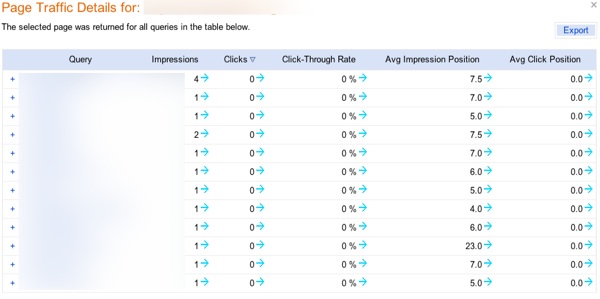
You can do the same thing here with average impression and average click position (and CTR) to evaluate pages which can use a refresh on title tags and meta descriptions for possible CTR upswings.

Another tip here would be to export the queries and see if there is potential to build out the page's category further with content targeted to specific queries.

So if a query is "chocolate truffles" and you are seeing some data for "white chocolate truffles" you might want to consider building out this section to include content specifically for those related but separate queries (if you haven't already)

Index Summary

The index summary page shows the index rate of your selected site, in Bing, over (roughly) the last 6 months.

The index summary chart is similar to the other charts in Bing's webmaster tools, which all the interactive sliding parameters that let you expand the report out over 6 months or drill down into a really tight, specific time frame.

Index Explorer

Bing's index explorer is a helpful tool that can alert you to HTTP code problems or confirm correct implementation of things like 301 directs.

The interface is easy to use:
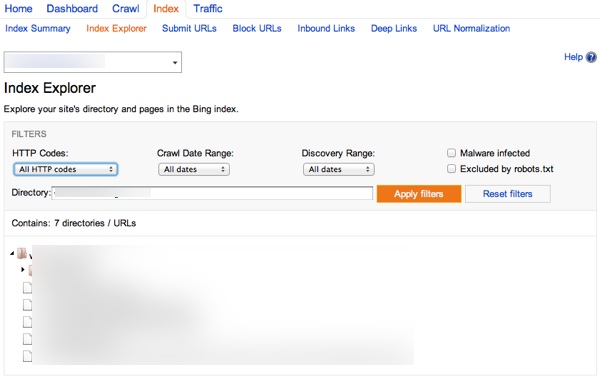
With the index explorer you can check the following HTTP status codes that Bing has discovered over your selected time period (all time, last week, last month) and over your selected crawl range (all time, last week, last 2 weeks, last 3 weeks):

  • All HTTP codes
  • HTTP codes 200-299
  • HTTP codes 300
  • HTTP code 301
  • HTTP code 302
  • HTTP codes 400-499
  • HTTP codes 500-599
  • All other HTTP codes

You can also search for pages where the Bing bot has identified malware as being present as well as choose to show pages that you've excluded in your robots.txt file:
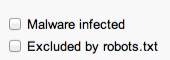
Below the options listed above, are where the pages that meet your filter requirements will show. It breaks the site down into categories and pages. When you hover over a page you'll see the following details:

If you click on a page you can also see a couple of additional data points:

  • Document size
  • Inbound links to the page
  • Block cache and block URL options for that particular page

Using this in conjunction with internal link checking tools like Xenu Link Sleuth (win) or Integrity (mac) can really help you get a good peek into the potential on-page technical issues of your site.

A couple of tools that give you valuable data about your on-page optimization are our Website Health Check tool (web based) and Screaming Frog's SEO Spider (mac/win).

I hope Bing adds some export functionality here, as they do in other areas of their webmaster tools, but the filtering options are solid enough to drill down into key issues for now.

Submit URLs

So this is a pretty straightforward option. Bing gives you the option to submit URLs (can be ones that are or are not in their index now) that you would like to request a recrawl or an initial crawl on.
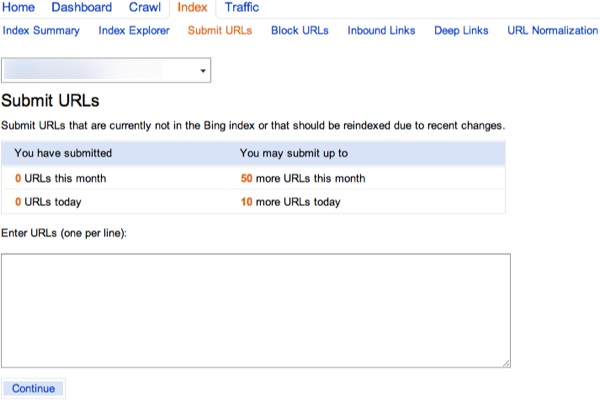
The URL allowance is pretty limited so it's best to save these requests for more important pages on your site (their crawl section has a spot for sitemaps).

Block URLs

You can also select pages, directories, or an entire site to block from indexing and/or Bing's cache:
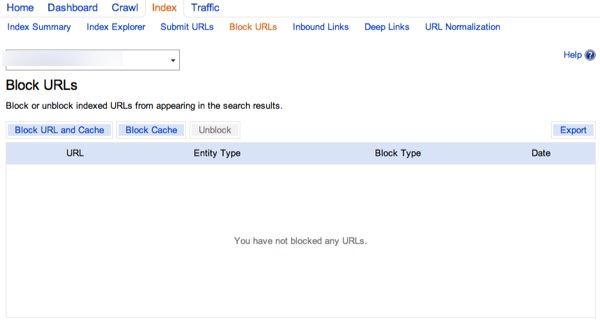
One area for improvement here, I think, is to be able to input or upload individual pages. As of now, you can only input 1 page per click, or select a directory to block (site.com/directory/), or block the entire site.

They do offer export functionality which is helpful when doing site audits, but a way to mass upload or input URLs would be nice (though you can tackle some of this with their URL normalization feature that will cover below).

Inbound Links

Bing will also show you the links they know about (in their index) that point to specific pages on your site.

Much like the charts above, you are presented with a historical chart which you can adjust with the slider below it (just like the Rank and Traffic stats shown prior).

Below those charts Bing will show you the pages on your site which have external inlinks and how many links they know of per page.

Once you click on a page, you'll see the linking URLs and the corresponding anchor text:
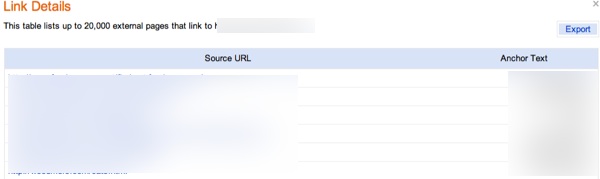
You can export page-specific links as well as the overall breakdown of pages with links and how many links those pages have. The export functions offer a nice way to get a high-level view of the overall link depth of your site.

While it's still a recommend practice to invest in a paid link research tool, supplementing your paid research by getting free link data from search engines is a no-brainer :)

Deep Links

Bing's Deep links are basically the same as Google Sitelinks. If you have been blessed by Bing, you'll see them in the Deep Links section of your site.
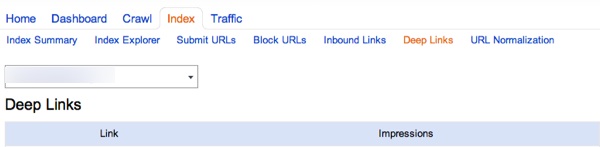
Bing's official statement on Deep Links is:

These Deep Links are assigned to websites which are seen by Bing to be ?authoritative? on the topic which they target. The best way to influence whether you are chosen to have Deep Links displayed for your website is to create unique, compelling content that pleases searchers. Sites receiving this feature do an excellent job of delivering what visitors want, and keep visitors coming back time and again.

URL Normalization

If your URLs encounter parameter issues that can lead to duplicate content (e-commerce sites, CMS functionality, etc) then you might want to take a look at Bing's URL normalization feature.

Google offers a similar tool called Parameter Handling (great write up on this from Vanessa Fox)
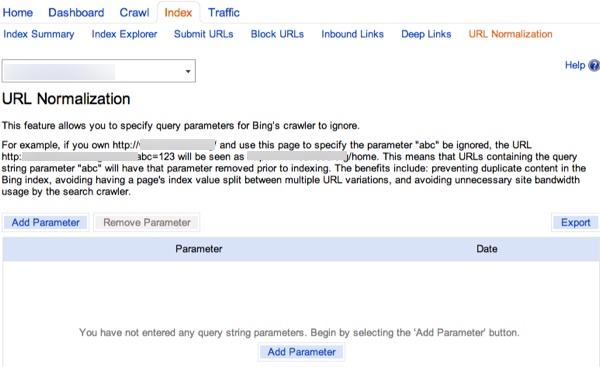
This is a section where you need to be really careful as to not unintentionally boot out relevant URLs and content from the site.

Combining this with use of the canonical tag (which Bing uses as a hint) is your best bet to ensure that there are as few duplicate content, link juice splitting issues on your site (with Bing).

Again, make sure you or your programmer(s) know what you or they are doing so you do not do more harm than good.

With Bing, you basically just add whatever parameter you want to ignore so make sure that parameter or parameters do not crossover to other areas of your site that you would rather not have Bing ignore:
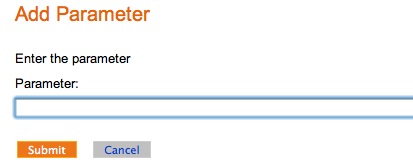
You can export all your inputted parameters as well.

Crawl Summary

The Crawl Summary section shows similar charts to other category charts inside Bing's Webmaster Tools on the landing page (6 month charting with interactive timeframe filtering).

You can check total number of pages crawled as well as pages with crawl errors off the landing page for this category (no exporting unfortunately) and dig into specific sections like:

  • Crawl Settings
  • Crawl Details
  • Sitemaps

Crawl Settings

Bing let's you set up custom crawl rates on a per site basis:
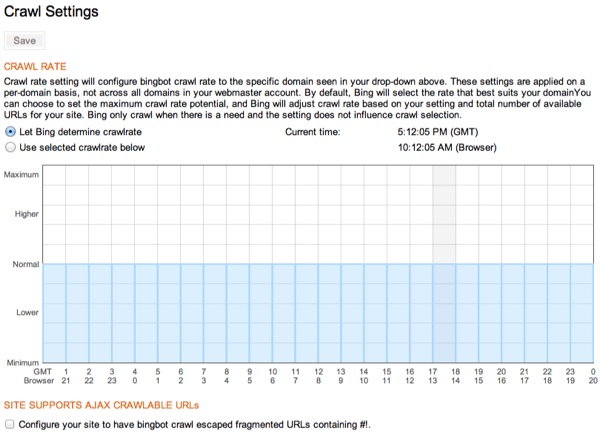
You may have situations where a custom crawl rate might make sense:

  • You want the bot to visit off-peak hours rather than when customers are visiting
  • You might be running special promotions or season promotions at specific times on an e-commerce site and want to limit bandwidth usage to visitors rather than Bing's bot
  • You might be doing a live stream or interview of some sort, and are expecting large amounts of traffic
  • Maybe you are doing some heavy content promotion across the web and social media and you want to avoid having any site load issues

You can use the timeframes given to line up with your server's location to make sure you are hitting the hours correctly (base time on the chart is GMT time).

You can also allow for crawling of AJAX crawlable URLs if so you choose. They recently rolled this out and their help section is weak on this topic so it's unclear on exactly how they'll handle it (outside of #!) but it's an option nonetheless.

Crawl Details

Bing's Crawl Details page gives you an updated overview of what's covered in the Crawl Summary. This feature doesn't require you to do any filtering to find issues, you can simply see if any of your pages have notable HTTP information, might be infected with Malware, and which ones are excluded by robots.txt.
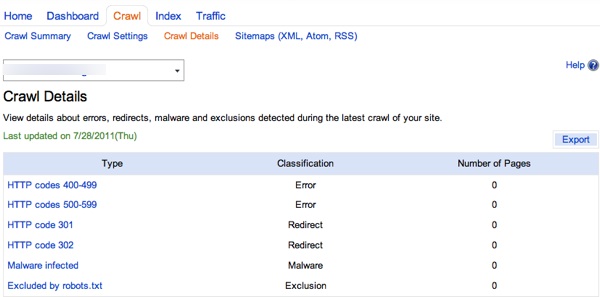
If you have any pages pop up, just click on the corresponding link to the left and a list of exportable pages will pop up.

Another helpful, exportable report for site auditing purposes.

Sitemaps (XML, Atom, RSS)

This is where you'd submit your sitemap to Bing. For XML sitemaps, double check your submission with the Sitemaps.Org protocol

For a site that's going to be a fairly static site (like this one) I'd pay more attention to proper site architecture rather than relying on a sitemap, I might even skip the sitemap unless I was using Wordpress where you could just have it auto-generate and update with new posts and such.
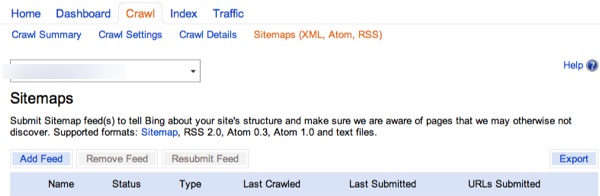
You can add, remove, and resubmit site maps as well as see the last date crawled, last date submitted, and URLs submitted.

Bing Webmaster Resources

Bing's recent update to their Webmaster Tools added a good amount of value to their reporting. Here are some additional resources to help you get acquainted to Bing.

Free Microsoft Advertising Coupon

While you are over at Bing, signing up for Webmaster Tools, feel free to use these Microsoft AdCenter coupons for your advertising account :)

Categories: 

Source: http://www.seobook.com/bings-webmaster-tools

social media marketing website development web hosting seo experts search engine marketing

Yahoo Says Goodbye to CEO Carol Bartz: Further Evidence of Yahoo?s Fruitless Struggle

To many it may come as little surprise to hear this Tuesday, Carol Bartz emailed her staff to notify them that she had just been unceremoniously fired from Yahoo via phone by Yahoo?s Chairman of the Board.

Carol Bartz

Photo Attribute : Yodel Anecdotal/Yahoo! Inc

Bartz?s three-year term as CEO has shown little progress, and clearly many folks are fed up. After Yahoo?s disastrous reign under Jerry Yang, many hoped Bartz would be able to turn things around and return Yahoo to its former glory, but things continue to look bleak for the fallen giant.

Yahoo once ruled the internet with an ironic exclamation mark. Those glory days seem so long ago now.

Yahoo

What Brought Yahoo Down?

How did a brand of such extreme success, arguably at one time the number one name on the web, take such a terrible nose dive?

Different people will offer varying opinions about what Yahoo?s fatal flaw was.

Lousy leadership has definitely played a role, as evidenced by Yahoo?s revolving CEO door.

Many people claim that Yahoo?s grievous error was in sacrificing its search engine soul in 2009, outsourcing search results to Microsoft and opting out of the search biz that they once ruled.  After backing out of the search arena, Yahoo started attempting to gain footing in personalized mobile news and tried to expand content offerings through their buy of Associated Press.

As Google continued to grow, Yahoo was forced to make huge layoffs and shut down or sell once valuable properties like Geocities and Delicious.

Yahoo?s purple power drained away as it spread itself too thin across various endeavors. I can sympathize to some degree?too many dreams and not enough direction is a dangerous mix.

Maybe Yahoo should have stuck with search rather than flying too close to the sun. Ultimately, Yahoo took some risks that just didn?t pay off.

Yahoo?s Rise and Fall

Focus created a great infographic documenting the rise and fall of Yahoo, and although the graph stops at 2010, I can spoil the ending for you?things don?t get better. At least not yet.

Rise and Fall of Yahoo Infographic

Finance graphs tell a similar tale of woe. It?s interesting to look at how hard Yahoo has fallen in just the past few years:

Yahoo Finance Graph1

While the company dreams of turning the clock back to the successful times surrounding 2007, it?s more depressing to take a step back even further and realize Yahoo?s best days are very, very far behind.

Yahoo Finance Graph2

What Is the Future of Yahoo?

Company Chairman Roy Bostock stated in a recent press release concerning the company?s ?leadership reorganization?: ?We are committed to exploring and evaluating possibilities and opportunities that will put Yahoo! on a trajectory for growth and innovation and deliver value to shareholders.?

Some wonder if this statement suggests Yahoo will be considering selling itself, either as a whole company or cut up as scrap parts. I?m sure shareholders are wishing Yahoo hadn?t rejected Microsoft?s 2008 buyout offer of $30 a share. With recent shares at $13.60, shareholders are dreaming of time machines.

So far, Yahoo has had a hard time hanging on to talent, but they?ll need someone special to help turn things around. If Yahoo can find the right CEO, they?ll still have a chance.

Kara Swisher of All Things D suggests some candidates to take over as Yahoo?s next CEO, with Snoop Dogg already generously offering his services.

Snoop as Yahoo's Future CEO?

They need someone inspiring who can harness the company?s confused chaos and bring focus. Maybe Steve Jobs will have pity on Yahoo and take on the challange. If not him, then someone with similar innovation and clear direction will be necessary to steer Yahoo out of the disaster zone.

What do you think? Who would you recommend as Yahoo's next CEO? And what will the company have to do to save its skin?

This post originated on the WordStream Blog. WordStream provides keyword tools for pay-per click (PPC) and search engine optimization (SEO) aiding in everything from keyword discovery to keyword grouping and organization.

Source: http://www.wordstream.com/blog/ws/2011/09/08/yahoo-says-goodbye-to-carol-bartz

website optimization improve google rankings search engine search marketing web 2.0 experts

Senior Marketing Manager / Virginia Tech / Blacksburg, VA

Virginia Tech/Blacksburg, VA

As the lead of the Marketing and Communications Group at Virginia Bioinformatics Institute (VBI) at Virginia Tech, the Senior Marketing Manager will be expected to develop and manage comprehensive marketing and communication plans in support of the Institute's vision and strategic...

View Full Description

Sponsored job from Linkup

Source: http://jobs.searchenginejournal.com/jt/jobs/view_click.php?job_hash_id=79f9938b03&intro_user_id=230245&source=rss_page

web 2.0 experts backlink building website promotion email marketing building traffic

Site Search Analytics: What Your Customers Want...In Their Own Words

by Mike Fleming


When people come to your site, it can be really hard to know why they are there.  The truth is the average conversion rate on e-commerce sites is only around 2-3%...and that's on sites that are specifically built to sell stuff.  So, what happens to the other 97%?  Why were they there?  Did they find what they were looking for?  If not, why not?  Is the content they are looking for even on your site?  If so, are they able to find it easily?

Keywords that bring users to the site via search engines can help, but visitors are prone to being vague when they use search engines.  But, there's one place to go for insights into why visitors are on your site that gets overlooked.  It's a place where your site visitors become much more precise about their browsing intent.  It's your site search data.  No, not the keywords they used in search engines to find your site.  It's the phrases they used to search ON your site after they arrived.

You don't have a site search box on your site?  That's a BIG no-no.  Around 80% of Web use starts with a search. Web users even type full URLs into search boxes instead of directly into the browser address bar.  The bottom line is that people are programmed to use search on the web whether it's a search engine or business website.  They don't want to look around.  They don't want to think about how to find what they're looking for.  They want it delivered to them.  That little box on your site is MUCH more important than you think it is, as it can be a very helpful tool for growing your business outcomes.  Why?  Because it's about the best place you can go online to learn what your users want in their own words.


Search Boxes.png

Most analytics vendors now provide a feature that collects and delivers your site search data to you in a report, making it easier than ever to get your hands on this golden data.  The sad thing is that most analytics profile owners are so unaware of site search analytics that they don't even have data collection turned on (Google Analytics).  But if you are undertaking any kind of site optimization from content development to information architecture to linking structure, site search analytics can help immensely in making your website a better customer service tool to improve your bottom line.

So, make sure you jump into your profile and keep reading along with future posts about how to take advantage of this valuable data.

Be sure and visit our small business news site.


Source: http://www.searchengineguide.com/mike-fleming/site-search-analytics-what-your-customer.php

web 2.0 experts backlink building website promotion email marketing building traffic

AdWords Experts Share the Secrets of Their PPC Success, Part 2

This is the second in a series of interviews we're conducting with AdWords advertisers who got unusually high scores using our AdWords Performance Grader. We're reaching out to high scorers to find out what strategies contribute to their strong AdWords performance. For more in this series, see:

Today’s interview is with Stefan van Vliet, co-owner of Dutch agency Compass Online Marketing.

Tell us a bit about yourself. How long have you been using AdWords? Are you an Agency or an Advertiser? What is your primary goal for AdWords marketing?

I have been working as an SEO consultant for a small Dutch web marketing agency for some years. Last February I launched a webstore, Feestkleding 365, selling fancy dress clothing. I was determined to launch before Carnaval (a big happening here in Holland) in order to tap into the massive demand. As SEO traffic is non-existent with a new site, I decided to use AdWords as our only sales channel. With some knowledge from a book and a few blogs but no experience, I put together an AdWords campaign. Sales went through the roof, but so did our AdWords costs. I chose to set the budget to virtually limitless and tried to optimize our campaign while running, but just couldn’t keep up (and honestly didn’t know what I was doing). So only 1 week and almost €10k in losses later I pulled the plug. So far for an expensive lesson in AdWords management: always test before you allocate serious budgets.

Can you describe your AdWords management strategy? How do you set your campaign objectives, and how do you know what’s realistic or not?

It took a while to find a strategy that was working for us. The thing is that our product assortment is quite large: we offer costumes and accessories for a big variety of themes. At the moment we are only targeting approximately 10% of those themes, and we gradually add campaigns for new themes as we go. Our strategy is something like this:

  1. Get sufficient data by bidding high and getting in spot #2-3 (above organic results).
  2. Keep track of conversions, cost per conversion and value per conversion (using conversion tracking with dynamic value tracking).
  3. Adjust bidding to meet a cost per conversion which is roughly 50% of the value per conversion.
  4. Optimize ads and try to improve conversion rates.

What makes this process quite difficult, is that although demand for fancy clothing overall is huge, search volume per theme can be quite low, which means that it can take quite some time to gather statistically significant data.

Any advice or tips for AdWords marketers that didn’t score as well as you?

Here’s my advice:

1. Leverage negative keyword lists. This helps us to efficiently manage our 20+ campaigns effectively. For example: we do not target keywords containing city names, as conversion rate is very low (apparently people looking for fancy clothing in a certain city do not wish to buy online). So we added 1,200 city names as negative keywords. If we didn’t use negative keyword lists, certain negative keywords, which only apply to 1 campaign, would easily get lost in the huge amount of other negative keywords. As some negatives are only added temporarily (for example certain products which are sold out but will be back in stock in a few months), it would be very hard to spot and remove those negatives.

2. Split campaigns on a low level. We decided to create a campaign for every theme, which allows us to add sitelinks related to that theme, and to easily segment data based on themes. Within the theme campaign, we add ad groups targeting keywords like [theme] + [clothing]. For example, within the Halloween theme, we have a separate ad group for Halloween clothing, Halloween costume, Halloween Fancy Dress etc. This improves CTR dramatically. Of course, this would only work if sufficient search volume exists on either of these ad group level keywords. At first, we even added ad groups targeting keywords like [theme] + [clothing] + [gender]. So we had ad groups for Halloween costumes for men, Halloween costumes for women, Halloween costumes for boys etc. But we soon found out that those Ad groups got ignored by Google due to low search volume. So these groups basically just cluttered our account and we decided to delete them.

3. Leverage advanced CPC bidding in AdWords Editor. If we add a new campaign, we want to gather data first, so we aim for spot 2. Sorting on current position and bulk editing CPC’s by +/- 10% is a fast and easy way to get your ad on that position until you have sufficient data. Be aware: choose a short timeframe when sorting on position (i.e. 1 day), as you don’t want to know the average position but your actual one. Also double-check position for keywords in the ad group: sometimes they vary greatly, which means you would have to split them up into different groups in order to effectively manage their CPC bids.

4. Use the comments function within AdWords Editor to make notes of what you do. Note date, current position, CTR, etc. and of course actions taken. This will keep things organized and help you see the effect of your actions immediately.

This post originated on the WordStream Blog. WordStream provides keyword tools for pay-per click (PPC) and search engine optimization (SEO) aiding in everything from keyword discovery to keyword grouping and organization.

Source: http://www.wordstream.com/blog/ws/2011/09/06/adwords-experts-2

link exchange pay per click ppc experts social media social networking